
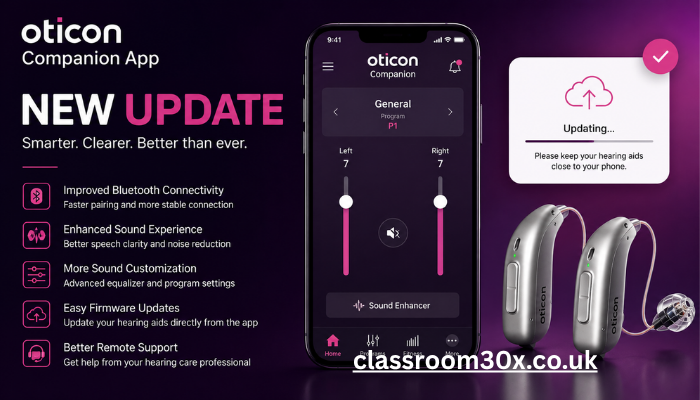
The Oticon Companion app is a powerful mobile solution designed to help users take full control of their hearing experience. Developed by Oticon, the app works as a digital bridge between modern hearing aids and smartphone technology, making it easier for users to adjust settings, personalize sound, and manage daily listening environments with comfort and precision.
In today’s fast-paced digital world, hearing aid users expect more than just amplification—they want control, clarity, and convenience. This is where the Oticon Companion app stands out. It transforms traditional hearing aid usage into a smart, user-friendly experience by allowing real-time adjustments, remote support, and personalized sound optimization directly from a smartphone.
This article explores everything you need to know about the Oticon Companion app, including its features, setup process, compatibility, benefits, and troubleshooting tips. Whether you are a new user or considering upgrading your hearing aid system, this guide will help you understand how this app can significantly improve your hearing experience.
What is the Oticon Companion App and How It Works
The Oticon Companion app is a dedicated mobile application that connects wirelessly to compatible Oticon hearing aids. It acts as a control center, enabling users to adjust volume, change programs, and fine-tune sound settings without needing physical adjustments on the device. This makes everyday hearing management more discreet and convenient.
At its core, the app uses Bluetooth connectivity to communicate with hearing aids in real time. Once paired, users can instantly modify sound preferences depending on their environment—whether they are in a crowded restaurant, a quiet room, or outdoors. The app also integrates smart algorithms that adapt sound settings based on user behavior and preferences.
Beyond basic controls, the app provides a more intuitive hearing experience. It allows users to monitor battery status, receive alerts, and access support tools. This ensures that users always stay connected to their hearing aids and can make quick adjustments whenever needed.
In addition, the interface is designed to be simple and accessible for users of all ages. Large icons, clear navigation, and step-by-step setup instructions ensure that even first-time users can operate the app without difficulty. This combination of smart technology and user-friendly design makes it an essential companion for modern hearing aid users.
Key Features and User Interface Experience
One of the strongest advantages of the Oticon Companion app is its rich feature set. Users can control volume, switch listening modes, and fine-tune sound balance between speech and background noise. These controls help create a more personalized listening experience in different environments.
Another important feature is the “Find My Hearing Aids” function, which helps locate misplaced devices using signal tracking. This is especially useful for users who frequently remove their hearing aids during the day. The app also includes remote support options, allowing hearing care professionals to assist users without requiring an in-person visit.
The user interface is designed with simplicity and accessibility in mind. The dashboard displays essential controls in a clean layout, making navigation smooth and intuitive. Users can quickly access frequently used settings without digging through complicated menus.
Additionally, visual indicators and sliders make adjustments easy to understand. For example, volume and sound balance are shown in clear, interactive formats, allowing users to make precise changes. This ensures that even users who are not tech-savvy can still enjoy a seamless experience.
Connectivity with Oticon Hearing Aids and Devices
Connectivity is at the heart of the Oticon Companion app experience. It is specifically designed to work with modern hearing aid models from Oticon that support wireless Bluetooth technology. Once paired, the connection remains stable and allows continuous communication between the device and the app.
The pairing process is straightforward. Users simply turn on Bluetooth, open the app, and follow on-screen instructions to connect their hearing aids. Once connected, the app automatically remembers the device, making future connections quick and effortless.
The app also supports dual-device connectivity, allowing users to connect to multiple hearing aids simultaneously for synchronized sound control. This is particularly useful for users who wear hearing aids in both ears, ensuring balanced audio delivery.
Furthermore, the app can integrate with smartphones and tablets, enabling users to receive calls, stream music, and watch videos with enhanced clarity. This seamless integration between hearing aids and smart devices creates a unified audio ecosystem that enhances everyday communication.
Customization, Accessibility, and Sound Control
Customization is one of the most powerful aspects of the Oticon Companion app. Users can adjust sound settings based on their environment, such as reducing background noise in busy areas or enhancing speech clarity in meetings. This flexibility ensures optimal hearing performance in all situations.
The app also offers personalized hearing profiles that adapt over time. By learning user preferences, it can suggest improved sound settings that match individual listening habits. This makes the hearing experience more natural and comfortable with continued use.
Accessibility is another key focus. The app includes features designed for users with different levels of hearing loss and technical ability. Large text options, simple navigation, and guided tutorials make it easy for everyone to use effectively.
In addition, users can save multiple sound programs for different environments. For example, one program can be optimized for outdoor use, while another can be tailored for quiet reading or watching television. Switching between these profiles is quick and effortless, improving convenience in daily life.
Troubleshooting, Updates, and Long-Term Benefits
Like any smart application, the Oticon Companion app includes built-in troubleshooting tools to help users resolve common issues. If a connection is lost, the app provides step-by-step instructions to re-establish pairing quickly. This reduces downtime and ensures continuous hearing support.
Software updates are another important feature. The app regularly receives updates that improve performance, add new features, and enhance compatibility with newer hearing aid models. Users are notified when updates are available, making maintenance simple and hassle-free.
Over the long term, the app significantly improves user independence. Instead of relying on frequent clinic visits for minor adjustments, users can manage most settings on their own. This empowers individuals to take control of their hearing experience.
Additionally, remote support features allow audiologists to assist users from a distance. This is particularly beneficial for elderly users or those living in remote areas. The combination of self-management tools and professional support ensures a balanced and reliable hearing care experience.
Conclusion
The Oticon Companion app represents a major advancement in hearing aid technology, offering users complete control, customization, and convenience in one intuitive platform. By connecting seamlessly with modern hearing aids, it transforms the way users interact with sound in their daily lives.
With features like real-time adjustments, personalized sound profiles, remote support, and smart connectivity, the app enhances both comfort and communication. For anyone using hearing aids from Oticon, this app is an essential tool that significantly improves overall hearing quality and user independence.
FAQs
1. What is the Oticon Companion app used for?
It is used to control Oticon hearing aids, adjust settings, and personalize sound experiences.
2. Is the Oticon Companion app free?
Yes, the app is free to download and use for compatible hearing aid users.
3. Which devices support the app?
It works with compatible Oticon hearing aids and most modern smartphones with Bluetooth.
4. How do I connect my hearing aids to the app?
Turn on Bluetooth, open the app, and follow the pairing instructions on screen.
5. Can I adjust volume using the app?
Yes, users can easily control volume and sound balance directly from the app.
6. Does the app work without internet?
Yes, basic hearing aid controls work via Bluetooth without internet access.
7. Can I locate lost hearing aids with the app?
Yes, it includes a “Find My Hearing Aids” feature for tracking devices.
8. Does the app receive updates?
Yes, regular updates improve performance and add new features.
9. Is the app suitable for elderly users?
Yes, it is designed with a simple and accessible interface for all age groups.
10. Can audiologists use the app for remote support?
Yes, professionals can provide remote assistance through supported features.
